Showing posts with label technobabble. Show all posts

Tuesday, August 23, 2011

ruby + xcode + macports + misc for the osx 10.5.8 g4 mac mini

no one supports leopard osx 10.5 for the g4 anymore since snow leopard and lion are the latest and greatest.  i was hoping to use this bad boy as my little test machine, but i can't even get rubygems to stop barfing on me and can only find installers for intel and x86 versions of software.  grr!  


my shitty little g4 specs:
osx 10.5
40GB Hard Drive
1.25 GHz PPC G4
512MB RAM
Radeon 9200
CD-RW Drive


resources i've located on the interwebz:
get xcode 3.0 for osx 10.5 here: https://connect.apple.com/cgi-bin/WebObjects/MemberSite.woa/wa/getSoftware?bundleID=19897


[save yourself some time and download this one instead!] 
get xcode 3.1 for osx 10.5 here: https://connect.apple.com/cgi-bin/WebObjects/MemberSite.woa/wa/getSoftware?bundleID=20414

get fink for osx 10.5 here: http://sourceforge.net/projects/fink/files/distribution/0.9.0%20for%20OS%20X%2010.5/Fink-0.9.0-PowerPC-Installer.dmg/download


get macports for osx 10.5 here: https://distfiles.macports.org/MacPorts/MacPorts-2.0.1-10.5-Leopard.dmg


get git 1.6.5 for osx 10.5 here: http://code.google.com/p/git-osx-installer/downloads/detail?name=git-1.6.5.1-UNIVERSALbinary-leopard.dmg&can=2&q=


get skitch for osx 10.5+: http://get.skitch.com/skitch.zip

how to get ruby using macports: http://paulsturgess.co.uk/articles/46-using-macportsdarwinports-to-install-ruby-on-rails-mysql-subversion-capistrano-and-mongrel-on-mac-os-x


i'll try to update this when i find more stuff...  happy hunting!

Monday, August 22, 2011

why i won't be buying an hp touchpad even if it's only $99...

i was so stoked when the palm pre first came out b/c webOS had so much potential (loved the multitasking + touchstone charging + device form factor), but ended up having way too many software and hardware problems (i'm on like my 3rd or 4th device) and the apps in the market suck!  when i read hp was liquidating their touchpads for $99 i was kicking myself for not waiting for this deal after having dropped $250 on a nook color b/c i'm a cheap ass, but realized it was running webOS and was like "oh nevermind..." since i'd be hard-pressed to buy another palm-now-hp-webOS-device ever again!

examples of some of the issues i've encountered:
• cracked screen @ micro usb port (this also happened to 2 different devices)
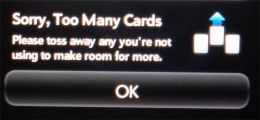
• too many cards error (this happens pretty regularly)


• locking up when taking photos

• stuck in headset mode (this has happened to 2 different devices)

btw, i LOVE my rooted nook!  i would definitely recommend hacking it to anyone looking for a inexpensive e-book reader/interwebz/casual gaming device!  

Tuesday, August 2, 2011

hide your email address using html + hex

let's say your email address is "name@domain.com". this is what it would look like in html:

<a href="mailto:%6e%61%6d%65%40%64%6f%6d%61%69%6e%2e%63%6f%6d"></a>

1) go to http://www.dolcevie.com/js/converter.html
2) enter your email address in the "Ascii" text field
3) click "Ascii to Hex" button
4) copy output
5) replace all ":" with "%"
6) be sure to insert a "%" before the first number or char after "mailto:"
7) tah dah!  hidden email!


thanks to http://csarven.ca/hiding-email-addresses for the tip!

Wednesday, July 27, 2011

open finder from terminal

this is embarrassingly simple:

$ open .

this will open whatever directory you're currently in.  pretty f-ing fantastic!  thanks to http://macsingularity.org/2003/11/01/open-a-folder-in-the-finder-from-the-terminal/ for the tip!

"cross-thread violation on rb_gc" when calling watir-webdriver via irb

i googled "cross-thread violation on rb_gc" and came across a ton of posts that were related, but not quite what i was experiencing.  in fact, i didn't find a post addressing cross-thread errors when calling watir-webdriver via irb, but found this: http://carol-nichols.com/2010/12/bug-cross-thread-violation-on-rb_gc

i uninstalled json and tah-dah!  cross-thread errors are gone!  thanks carol!  hopefully, i won't need json anytime soon otherwise i might have just created an even bigger problem for myself.  heh!

UPDATE:
if you reinstall json it still works.  just tried calling watir-webdriver in irb w/out errors.  w00t!

Sunday, July 10, 2011

eye-fi sux!


brad and i tried installing the eye-fi on both our machines, a windows + a mac, and couldn't get either to work. in fact, it locked up my machine + wasn't even recognized on his. boo! the 4gb eye-fi sd card gets two thumbs down + is getting returned tomorrz...

Tuesday, May 24, 2011

"LoadError: no such file to load -- firewatir" issues running firewatir in irb

i kept hitting "LoadError: no such file to load -- firewatir" when i'd call firewatir AND rubygems in irb. ends up my ruby + gems were a hot mess! i had multiple copies in different places and the last thing i wanted to do was symlink 'em together b/c i knew it would bite me in the ass later so i did some extensive googling an found lots of good info that i'll summarize for you below...

first fix your ruby setup!

this is what i was seeing before:
$ which -a ruby
/usr/bin/ruby
/opt/local/bin/ruby

this is where it's supposed to be:
$ which -a ruby
/usr/local/bin/ruby

i wiped out these two ruby dirs as well was the gems + irb libs/dirs:
$ sudo rm -rf /usr/bin/ruby
$ sudo rm -rf /usr/local/bin/rub
$ sudo rm -rf /usr/local/lib/ruby
$ sudo rm -rf /usr/lib/libruby*
$ sudo rm -rf /usr/lib/libsvn_swig_ruby*
$ sudo rm -rf /usr/lib/ruby*
$ sudo rm -rf /usr/bin/irb
$ sudo rm -rf /opt/local/bin/irb
$ sudo rm -rf /usr/bin/gem

i downloaded + installed:
RubyOSX-1.8.7-p172-INTEL_Leopard.pkg.zip

then did this to verify that my latest ruby version was installed in the correct spot:
$ which -a ruby
/usr/local/bin/ruby

next, i went out and downloaded all the gems i needed...
$ sudo gem update --system
$ sudo gem install cucumber
$ sudo gem install firewatir
$ sudo gem install watir-webdriver
$ sudo gem install rcov
$ sudo gem install capistrano
$ sudo gem install capistrano-ext
$ sudo gem install mocha
$ sudo gem install ruby-debug
$ sudo gem install mongrel

i fired up irb and the "LoadError: no such file to load -- firewatir" errors were gone, but i was still having issues launching firewatir due to jssh not initializing properly. ends up all i have to do is call this before calling firewatir:
/Applications/Firefox.app/Contents/MacOS/firefox-bin -jssh
(thanks for the hint stackoverflow!)

Monday, May 16, 2011

make mp3's louder with ffmpeg

awesome find!

ffmpeg -i FILENAME.mp3 -vol XXX FILENAME.mp3

http://ubuntuforums.org/showthread.php?t=1534967  thanks ron999!

UPDATE:
if you have ffmpeg on your machine, you probably already have lame installed too! try this:

lame FILENAME.mp3 --scale XXX FILENAME.mp3

Sunday, May 8, 2011

how to export your mac mail rss feeds...

$ IFS=$'\n';for i in $(find ~/Library/Mail/RSS/ -name "Info.plist");do grep "<string>http://" $i | sed "s/.*\(http[^<]*\).*/\1/";done
here's my export:


http://www.liveaquaria.com/diversden/feed/ddfeed.xml
http://feeds.feedburner.com/reefbuilders/CTjt?format=xml
http://www.reeffrontiers.com/classifieds/external.php?type=RSS2&amp;cat=4
http://www.komonews.com/news/?fin=xml&amp;type=default&amp;c=y
http://feeds.nationalgeographic.com/ng/News/News_Main
http://000hlala.blogspot.com/feeds/posts/default
http://feeds.boingboing.net/boingboing/iBag
http://img.perezhilton.com/services/rss/rss2.xml
http://feeds.feedburner.com/popsugar
http://www.tmz.com/rss.xml


kind of awesome eh?  courtesy of http://hints.macworld.com/article.php?story=20080319094830396

Friday, April 22, 2011

ffmpeg: "Unable to find a suitable output format for..."

bloody hell! ffmpeg hates me... i'm n00bin' around w/ ffmpeg right now + all i want to do is convert a shitty little *.flv file to *.mp4v + *.mpeg + every other possible format under the sun. i've already enabled various libs. not sure where to go from here. argh!

$ ffmpeg -i FILENAME.flv FILENAME.mp4v
FFmpeg version 0.6.1, Copyright (c) 2000-2010 the FFmpeg developers
built on Mar 28 2011 13:50:57 with gcc 4.2.1 (Apple Inc. build 5666) (dot 3)
configuration: --prefix=/opt/local --enable-gpl --enable-postproc --enable-swscale --enable-avfilter --enable-avfilter-lavf --enable-libmp3lame --enable-libvorbis --enable-libtheora --enable-libdirac --enable-libschroedinger --enable-libfaac --enable-libfaad --enable-libxvid --enable-libx264 --enable-libvpx --enable-libspeex --enable-nonfree --mandir=/opt/local/share/man --enable-shared --enable-pthreads --disable-indevs --cc=/usr/bin/gcc-4.2 --arch=x86_64
libavutil 50.15. 1 / 50.15. 1
libavcodec 52.72. 2 / 52.72. 2
libavformat 52.64. 2 / 52.64. 2
libavdevice 52. 2. 0 / 52. 2. 0
libavfilter 1.19. 0 / 1.19. 0
libswscale 1.11. 0 / 1.11. 0
libpostproc 51. 2. 0 / 51. 2. 0
[flv @ 0x12180c800]Estimating duration from bitrate, this may be inaccurate

Seems stream 0 codec frame rate differs from container frame rate: 1000.00 (1000/1) -> 25.00 (25/1)
Input #0, flv, from '320x240_EdinburghCastle-3D_LowQ.flv':
Metadata:
duration : 192
starttime : 0
totalduration : 192
width : 400
height : 226
videodatarate : 258
audiodatarate : 59
totaldatarate : 325
framerate : 25
bytelength : 7801152
canseekontime : true
sourcedata : B4A7DD164MM1302532569303637
purl :
pmsg :
Duration: 00:03:11.92, start: 0.000000, bitrate: 272 kb/s
Stream #0.0: Video: flv, yuv420p, 400x226, 264 kb/s, 25 tbr, 1k tbn, 1k tbc
Stream #0.1: Audio: mp3, 22050 Hz, 2 channels, s16, 8 kb/s
Unable to find a suitable output format for 'FILENAME.mp4v'

UPDATE:

i found this awesome little tidbit on http://www.ffmpeg.org/ffmpeg-doc.html#SEC11:

`-target type'
Specify target file type ("vcd", "svcd", "dvd", "dv", "dv50", "pal-vcd", "ntsc-svcd", ... ). All the format options (bitrate, codecs, buffer sizes) are then set automatically. You can just type:


ffmpeg -i myfile.avi -target vcd /tmp/vcd.mpg


Nevertheless you can specify additional options as long as you know they do not conflict with the standard, as in:


ffmpeg -i myfile.avi -target vcd -bf 2 /tmp/vcd.mpg

all i had to do is specify a target and it did all the bitrate-frame-conversion-crap for me! awesome sauce!

$ ffmpeg -i FILENAME.flv -target "vcd" FILENAME.mp4v